
Instructions
Papaya POS Integration with VEXiON cards: An Automatic Loyalty Program for Your Restaurant
Connecting VEXiON cards with Papaya POS brings an automatic loyalty program straight to your cash register. Stamp cards, discount cards, and points-based cashback cards with setup in 10-15 minutes.
VEXiON Team·Mar 18, 2026
Papaya POS Integration with VEXiON cards: An Automatic Loyalty Program for Your Restaurant
Connecting VEXiON cards with Papaya POS brings an automatic loyalty program straight to your cash register. The customer scans the card from their phone, the system adds stamps or points or applies a discount, and updates the card. Your staff doesn't have to enter or calculate anything — everything runs on its own.
- Automatic processing in a few seconds
- Stamp cards, discount cards, and points-based cashback
- Gift cards coming soon
- Setup in 10–15 minutes
- One program for all locations
Updated: March 2026
- Available: Stamp cards, discount cards, points-based cashback
- Coming soon: Gift cards
- Official partnership: Papaya POS lists VEXiON as an integrated loyalty system
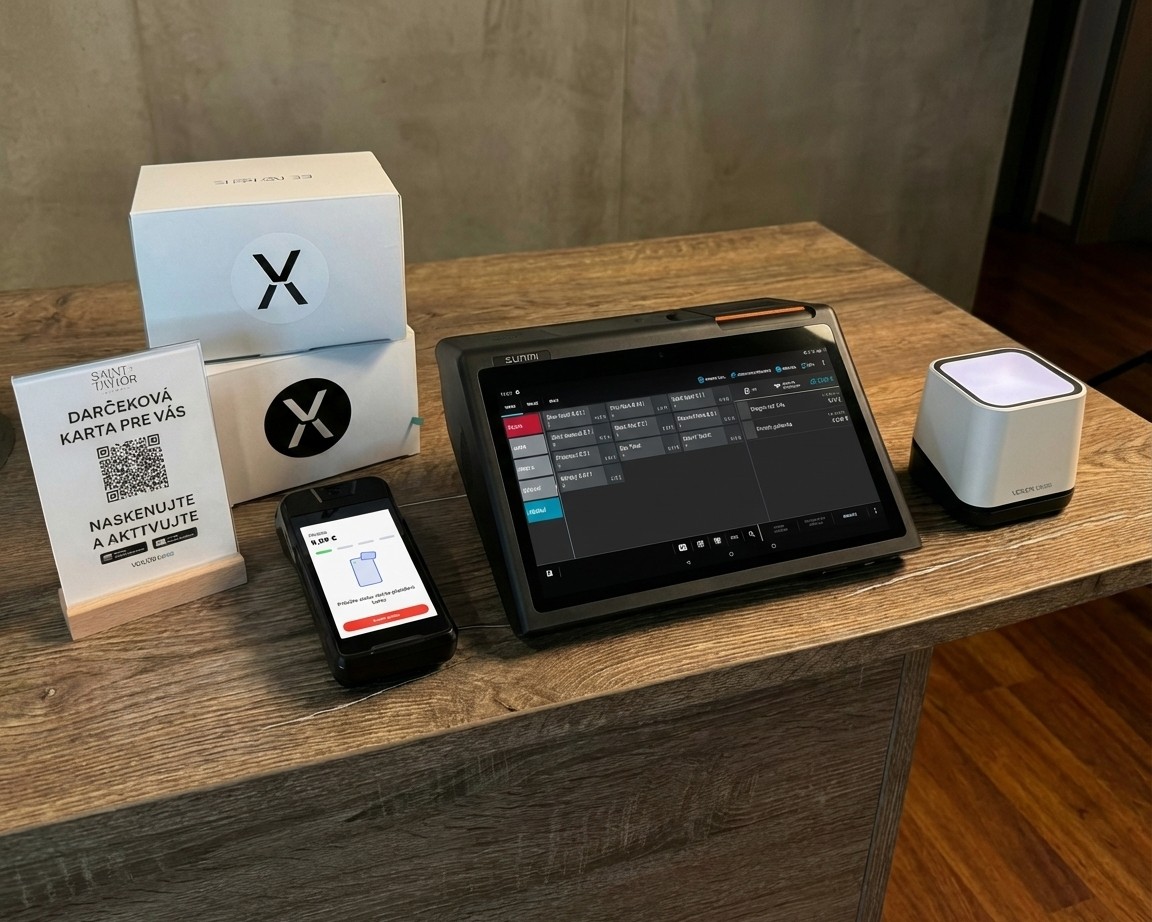
VEXiON cards integration with Papaya POS — complete setup with the register and a mobile scanner showing a customer card
What Is Papaya POS and Why Integrate with VEXiON cards?
Papaya POS is a Slovak point-of-sale system built for the hospitality segment. It's used by hundreds of cafés, restaurants, bars, and bistros all over Slovakia — from Bratislava venues like La Donuteria, Hollerung, Bounty Boho, Crustoria, and Koun, to venues in other regions.
The system runs on Android devices and offers everything a hospitality business needs: the register, mobile servers, inventory management, payment terminals, and eKasa. Now you can add an automatic loyalty program on top.
On its page about loyalty systems, Papaya POS lists VEXiON cards as an officially integrated solution — alongside features like push notifications, customer-data collection, and personalized campaigns.
You know the scene: a customer walks in, orders, and you ask about their paper loyalty card. They forgot it, lost it, or it's so worn out you can't count the stamps. With the VEXiON cards + Papaya integration, that problem disappears.
The customer has the card on their phone directly in Apple Wallet or Google Pay. At checkout they show it, staff scans it at the register, and the system automatically adds stamps or points or applies a discount. No manual counting, no paper cards, no extra work.
Key takeaway
- Papaya POS is a popular Slovak hospitality POS system
- VEXiON is officially integrated on the Papaya POS website
- The integration delivers an automatic loyalty program without paper cards
How Does Scanning Work at the Papaya Register?
The whole process is designed to be as simple as possible. Staff don't have to learn anything new — they just need to know how to scan a QR code.
Step by Step
Step 1: Enter the order into the Papaya register as you normally would. Add the coffee, food, whatever the customer ordered.
Step 2: When the customer is ready to pay, click the "DISCOUNT/SURCHARGE" button in the top-right corner of the screen.
Step 3: Scan the customer's QR code from their phone (Apple Wallet or Google Wallet) using a physical scanner, or tap the scanner icon (scanner/camera icon) if the register has a built-in camera.
Step 4: A message appears in the middle-bottom of the screen with the details: how many stamps or points the customer earned, their current balance, and any discount or cashback applied.
Step 5: Complete the payment as usual.
That's it. Stamps are assigned automatically. Points are credited automatically. Cashback and discounts are processed at the moment the card is scanned. Staff doesn't have to decide or enter anything.
Key takeaway
- Staff click "DISCOUNT/SURCHARGE" and scan the card
- The system automatically handles stamps, points, and discounts
- The message appears in the middle-bottom of the screen
Three Card Types: Stamps, Cashback, and Discounts
With the Papaya integration, you can currently run three types of loyalty cards. Each fits a different scenario.
Stamp Card — The Classic That Works
The most popular type of loyalty card. The customer collects stamps for purchases and, once they hit a set count, they earn a reward.
How it works in practice:
- The customer buys a coffee → earns 1 stamp
- Next visit they buy another → has 2 stamps
- They keep collecting...
- When they have 10 stamps and the card is scanned → the cheapest item on the receipt is automatically free
- Stamps reset and the customer starts collecting again
The system always picks the cheapest product on the receipt that's included in the loyalty program. Neither the customer nor the staff has to do anything extra.
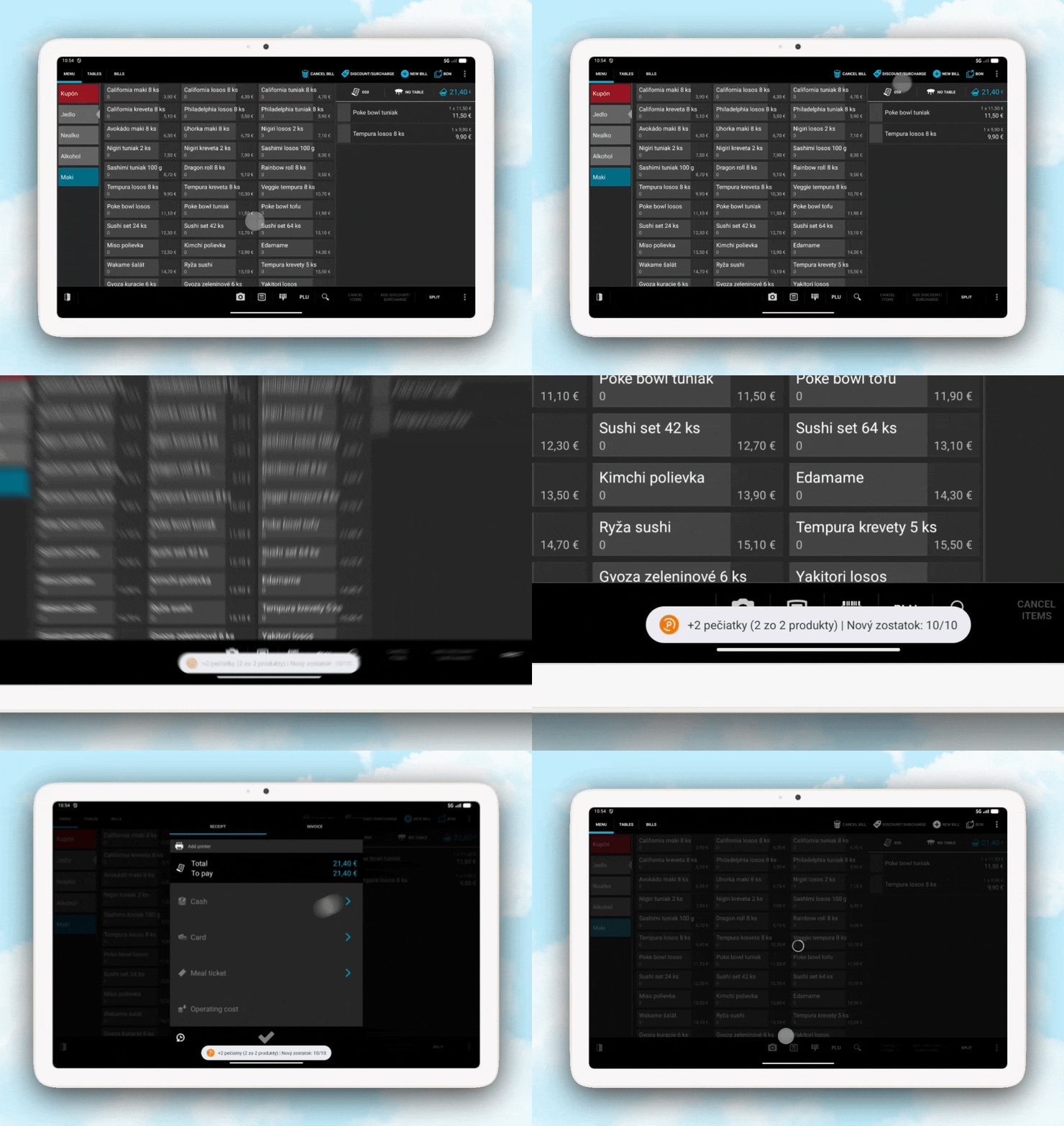
- Message when collecting: "+1 stamp from 1 of 2 products | New balance: 7/10"
- Message on reward: "Free Espresso (10 stamps) | New balance: 0/10"
What the staff sees on the register screen:
Example setup for a café:
Ideal for: Cafés, bakeries, fast food, ice-cream shops, bistros
Points Card with Cashback — Money Back on Purchases
Cashback is the most flexible type of loyalty program. On every purchase, the customer gets back a small portion of what they spent in the form of points. Those points accumulate and the customer can redeem them as a money discount on a future purchase.
Why cashback works so well:
- Customers love coming back because their "credit" keeps growing
- Unlike stamps, it works across all products at once
- Points are automatically converted into a money discount on redemption
- Simple for staff — the system handles everything
How it works in practice:
- The customer buys a Cappuccino for €3.20 → earns 6 points
- Next visit they buy a Latte for €3.50 → earns 7 points. Balance: 13 points
- They keep collecting with every purchase
- Once they've saved up enough points, they redeem the cashback and the points are converted into a money discount on the receipt
- Example: with 300 points and buying a €3.20 Cappuccino, the cashback is applied and the customer pays less
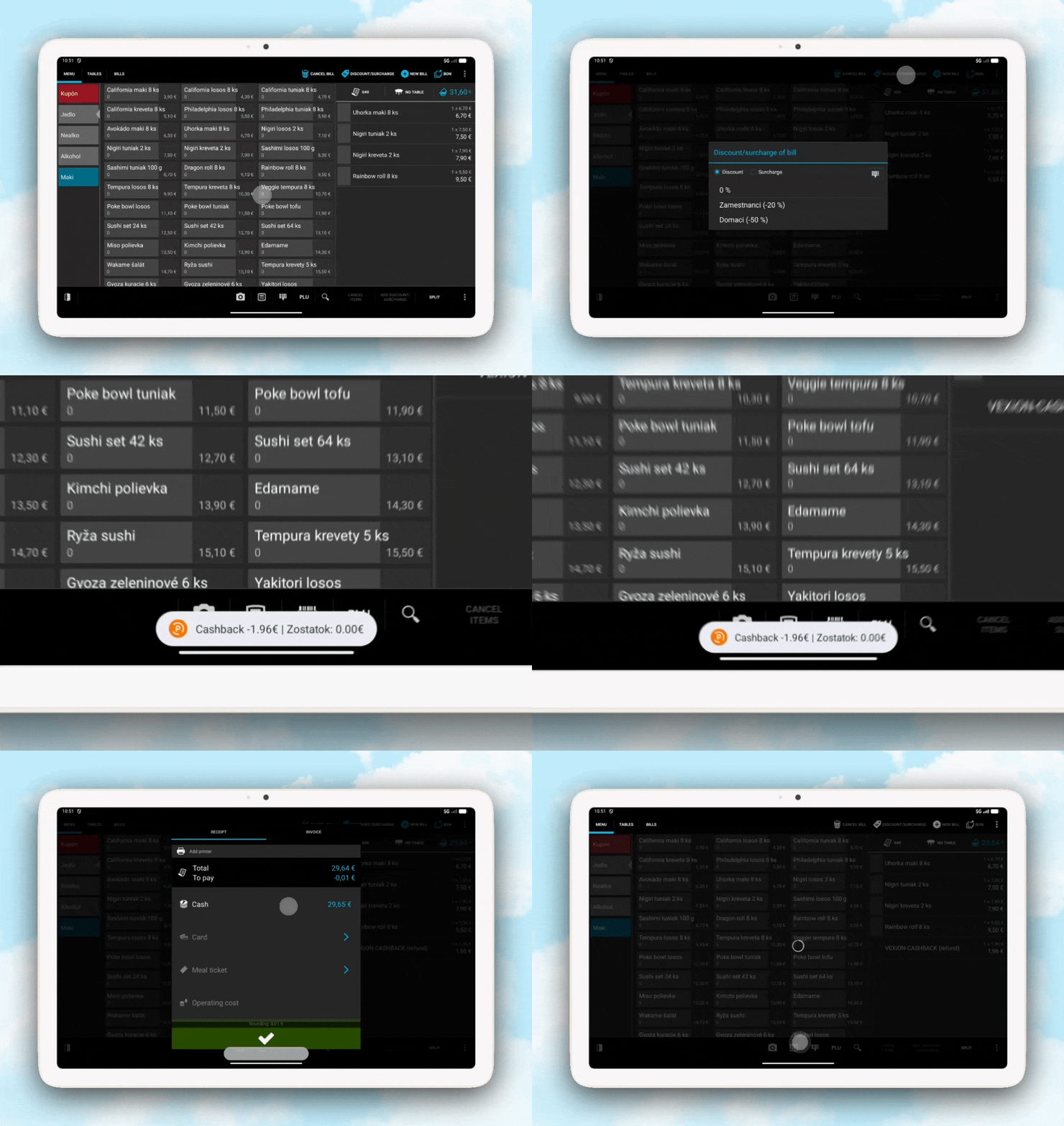
- Message when collecting: "Balance: €0.13 | +7 points (1 of 2 products)"
- Message on cashback: "Cashback -€3.00 | Balance: €0.50"
What the staff sees on the register screen:
Example setup for a café with cashback:
More expensive products give more points, so the customer is fairly rewarded for bigger purchases.
Ideal for: Restaurants, cafés with higher average checks, venues where you want to reward overall spend
Discount Card — A Reward for Regulars
Discount cards work on a tier principle. The more a customer spends with you in total, the higher the tier and the discount they receive.
How it works in practice:
- The customer starts at the Bronze tier with a 5% discount
- When they spend a total of €100, they move up to Silver with 10% off
- When they spend €500, they move up to Gold with 15% off
- The discount applies automatically on every purchase
The new tier becomes active starting from the next purchase. If the customer has just reached Silver, the current purchase still goes through at the Bronze rate.
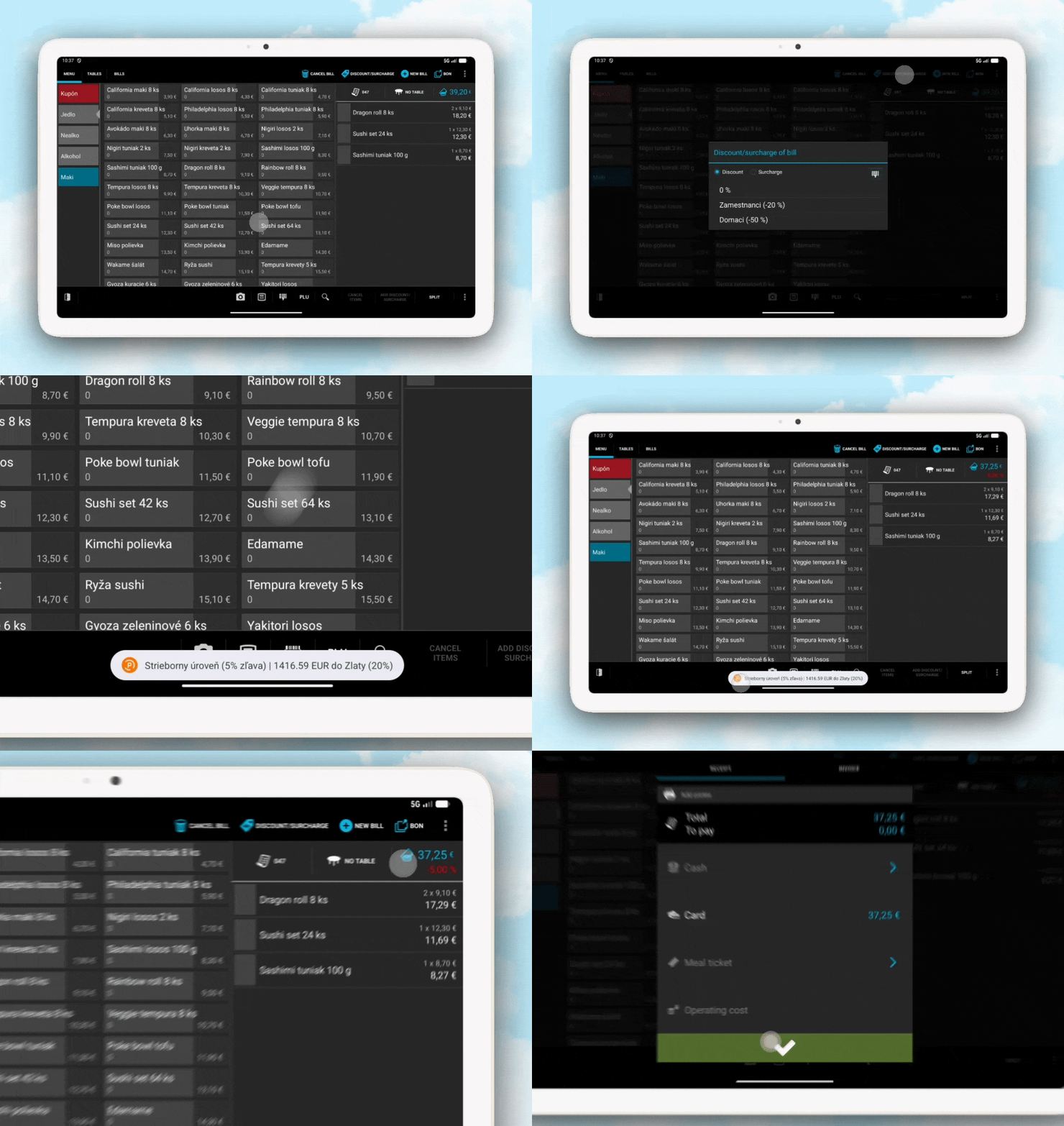
Animation showing a card scan at the Papaya register and messages across different discount tiers
- Message at Bronze: "Bronze tier (5% off) | €50.00 to Silver (10%)"
- Message on upgrade: "Congratulations! You've reached Silver tier (10% off)!"
What the staff sees on the register screen:
Ideal for: Restaurants with regular guests, venues with higher average checks
Key takeaway
- Stamp card: Collect stamps, reward after reaching the set count
- Points card: Euro cashback for purchases
- Discount card: Percentage discount based on total spend
- All three types run automatically without work for staff
Stamps vs. Cashback: Which System Should You Pick?
Not sure whether stamps or a points system is better for you? Here's a comparison:
Important: You can't have stamps and cashback at the same time. You can, however, combine cashback with discount cards.
Key takeaway
- Stamps are better for specific products (e.g., "10th coffee free")
- Cashback is better for rewarding the total purchase
- Both systems are equally simple to use
Coming Soon: Gift Cards
Stamp cards, points (cashback) cards, and discount cards are currently available. We're adding another type in upcoming updates.
Gift Card
A prepaid card with credit that someone buys and gives away. The recipient then draws down the credit on purchases. More about gift cards in the article Digital gift cards for hospitality.
We'll let you know when this type becomes available.
Key takeaway
- Currently: Stamp cards, points (cashback) cards, and discount cards
- Coming soon: Gift cards
- We'll announce when new types are available
Menu Setup: Which Products Earn Stamps or Points
After connecting with Papaya you need to set which products let customers earn stamps or points. The process is simple.
Syncing the Menu from Papaya
- In the VEXiON admin dashboard, pick the location
- Click "Sync menu"
- Wait a moment — the system pulls all products from your Papaya register
- A table appears with every product
Key takeaway
- The menu syncs from Papaya in one click
- For stamps you set earn/redeem/discount
- For cashback just set the point count
- Excel import supports bulk setup
Multiple Locations? One Program for All of Them
If you have multiple locations using Papaya, you can connect each one to a single VEXiON loyalty program.
The customer collects stamps or points at one café and redeems the reward at another. Points apply across every location. You have a central view in one dashboard. After adding the first location, click "Add another location" and repeat the process.
Key takeaway
- One loyalty program for all your Papaya locations
- Customers collect and spend stamps/points anywhere
- Centralized management in a single dashboard
VEXiON cards + Papaya vs. Paper Cards
Switching to digital cards saves time and helps the environment. More in the article Digital cards for a greener planet.
Key takeaway
- The digital solution eliminates every drawback of paper
- Automatic processing without mistakes
- Push notifications keep customers in sight
Common Situations
Customer forgot their card: The transaction goes through as a regular purchase. Stamps/points aren't awarded and can't be retroactively added.
Customer asks about their balance: After scanning, the current balance is shown. The customer can also check it in the mobile app.
Customer didn't get cashback: Check whether the customer has enough credit on the card. Cashback is applied when the customer has enough points saved.
Key takeaway
- Staff only scans the card, everything else is automatic
- 6 simple steps on every purchase
- Training takes 5 minutes
Frequently Asked Questions
How much does the Papaya integration cost?
The integration is part of the standard VEXiON cards subscription (from €41/month). No extra fees from our side for connecting to Papaya.
Which card types are currently supported?
Stamp cards, points cards with cashback, and tiered discount cards. Gift cards are coming.
How long does setup take?
The whole setup takes 10–15 minutes. You need access to the Papaya admin and the VEXiON dashboard.
Does it work across all my locations?
Yes. One loyalty program can be linked to all your Papaya locations. The customer collects and spends stamps/points anywhere.
Can I have cashback and stamps at the same time?
No — they're two modes of the same switch. But you can combine cashback + discount cards, or stamps + discount cards.
How is cashback applied?
The customer collects points for every purchase. Once they have enough credit, they can redeem it on their next purchase by scanning the card. The discount is subtracted from the receipt.
What if the customer has €8 in cashback but the bill is only €6?
Cashback covers the whole bill (€6) and the remainder (€2) stays on the card for the next purchase.
Do I need to train staff?
Training takes about 5 minutes. Staff learn to click DISCOUNT/SURCHARGE, scan the card, and check the message.
Can decimal numbers be used for stamps?
No. Use only whole numbers (1, 2, 3...). Decimals aren't supported.
Who Is the Papaya Integration Right For?
Cafés and bakeries: The "10th coffee free" stamp card is the classic. Or cashback for rewarding the total purchase. Restaurants: Cashback for regulars + tiered discount cards (Bronze, Silver, Gold). Combine with prepaid cards. Bistros and fast food: Quick processing is key. Scan the card, done. Bars: Discounts for regulars, cashback on drinks, different rules for different products.
More strategies in the article How to retain customers and grow revenue.
Key takeaway
- The integration suits any hospitality business on Papaya
- Three card types for different scenarios
- Quick processing without delays
Summary: An Automatic Loyalty Program for Papaya
Paper cards are the past. With VEXiON cards and Papaya POS you have a loyalty program that runs itself.
Customer scans the card on their phone → System adds stamps/points or applies discount/cashback → Card updates → Done.
Setup takes 10–15 minutes. Staff training takes 5 minutes. After that, everything runs automatically.
💡 Tip: Papaya POS officially recommends VEXiON cards on its website as an integrated loyalty solution.
Need help with setup?
📧 jakub@vexioncards.one
📱 +421 948 777 490
We'll happily help you set it up, or we'll do it for you. The first consultation is free.